43 Folders

43 Folders feed subscription icon - Shiny!Time, Attention, and Creative Work. After 4 years and a lot of productivity pr0n, we’re shifting gears. Re-learn how to use 43 Folders. Then back to work. [»]

”What’s 43 Folders?”
43Folders.com is Merlin Mann’s website about finding the time and attention to do your best creative work.

Beeswax: Free Productivity App in the Spirit of Lotus Agenda

Beeswax - Mind Your Own Beeswax

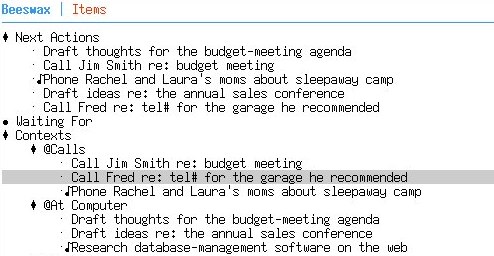
Wow, this looks like a really interesting project to watch — a GNU-licensed, command line productivity app that finds inspiration in a bona fide classic:

Beeswax is an information management system inspired by Lotus Agenda. It aims to recreate Agenda’s flexibility and efficiency in a clutter-free, text-based (ncursesw) user interface with vi key bindings. Beeswax views & reports will have specifications for sections, columns, filtering, and sorting…

The relationships between items of information are highly flexible. An item can be easily assigned to several different categories and the view immediately displays the new relationships. An item can just as easily be detached from categories. As you move items through Beeswax, their relationship to each other remains highly flexible.

You still hear a lot of people saying Agenda is the closest they ever got to their dream productivity app. And, depending on who you ask, Agenda’s endless flexibility was either incredibly powerful or infinitely fiddly.

Beeswax is a very young application, but I’ll definitely be giving it a spin. There’s certainly a long-standing itch for Agenda that lot of folks would love to have scratched.

The Question to You

Any of the old hardcore Agenda folks tried out Beeswax yet?

[via Anarchaia]


Comment viewing options

Select your preferred way to display the comments and click "Save settings" to activate your changes.
warthurton's picture

Chandler

I just started experimenting with Chandler. This is the application that Mitch Kapor (co-writer of Agenda) has been working on at OSAF for years. The creation of the software was chronicled in the book Dreaming in Code

dancemonkey's picture

thank you

Just… thank you. Amazing application. I don’t remember falling in love, truly falling in love with software before. Warts and all, I love Chandler.

dancemonkey's picture

slight refinement of earlier effusiveness

Chandler is great, but still too young, buggy, and slow. It has however informed me of what I want in an organizational app, so I know better what I’m looking for.

augmentedfourth's picture

Installed... but it wasn't easy

I got the program installed on my Ubuntu server, but it wasn’t easy. You need to install the -dev versions of all the packages listed on the Beeswax page as requirements, because they provide libraries that are referenced as the program files are compiled.

In addition, I had to edit a header file (beeswax.h) because it was referencing a standard ncurses library file improperly. (It was trying to include <ncursesw/curses.h>, but at least on my system the proper syntax is just <curses.h>).

Finally, you need to run it with your TERM environment variable set to “xterm”, or the lines in the ncurses display are rendered oddly.

Basically, the setup is definitely not end-user-friendly— at least, not yet. It’s probably even tougher in Mac OS X, since the prerequisites aren’t just an “apt-get install” away.

The program itself seems easy enough to get around in, and extensible enough to be very easy to tweak the system to your liking. However, the printing function leaves a lot to be desired.

But it’s just version 0.2. I can see this shaping up into a really cool tool, should it receive the development resources it needs.

bdillahu's picture

Ubuntu issues

Well, I got past the ncurses thing without modification, but I get an error:

display.c: In function 'displayLine':
display.c:41: error: 'wint_t' undeclared (first use in this function)
display.c:41: error: (Each undeclared identifier is reported only once
display.c:41: error: for each function it appears in.)
display.c:41: error: expected ';' before 'bullet'
display.c:53: error: lvalue required as left operand of assignment
display.c:54: error: 'bullet' undeclared (first use in this function)
make: *** [display.o] Error 1

Any guesses? I would love to give it a try, but.

Bruce

KC8ZKF's picture

Re: Ubuntu issues

wint_t is declared in wchar.h.

Try adding “#include <wchar.h>” in display.c.

augmentedfourth's picture

Oh yeah...

I forgot, I had to do that too.

bdillahu's picture

Thanks!

That worked perfectly… thanks so much!

Now something else to play with :-)

Bruce

chrispoole's picture

Emacs org-mode

This looks similar to Emacs' org-mode.

I'm currently trying this implementation out now.

It's very stable, has some great features (taggin for contexts, and you can easily set NEXT or WAITING etc.).

It's then trivial to just show the next actions for a certain context, with a simple keyboard shortcut. Combine this with a macro, and you can have custom shortcuts for your GTD stuff.

http://orgmode.org/

http://members.optusnet.com.au/~charles57/GTD/orgmode.html

kwelndar's picture

org-mode Rules

I’ve been using org-mode for a while now, and I really love the way you can use tags for multiple contexts. It seems that multiple contexts is a big point of discussion among GTD app people, but for me it’s great to be able to see something I can do in any place or mindset I happen to be in. If I need to get in touch with someone, it could be on their agenda, and the contexts phone and email at the same time (yes, I know most people prepend ‘@’ for contexts, but in the book that was only a hack to get these things to list first in certain GTD-unaware apps like email clients).

The pretty much free-form way you can structure the files and link between them can fit just about any way you like to work. I put my small projects (2-7 steps or so) into one large file, keep the larger projects and my thoughts and ideas about them in their own files, and simple NEXT actions in their own files. I can link to all these from a master file for easy weekly reviewing.

If any emacs user out there doing GTD hasn’t tried org-mode, I urge you to do so at your earliest convenience. If you have a recent version, you don’t even have to install anything. Once you get used to it you might want to upgrade to the lastest version, though.

I found the agenda view a bit unwieldy if you just want a certain context list, however, especially if you want to print it out, so I wrote a little shell script that looks through all the .org files and spits out a little checklist of the context you want to see. It keeps me sane.

About Merlin Mann

Merlin Mann's picture

Bio

Merlin Mann is an independent writer, speaker, and broadcaster. He’s best known for being the guy who started the website you’re reading right now. He lives in San Francisco, does lots of public speaking, and helps make cool things like You Look Nice Today. Also? He looks like this, answers questions, and has something like a life.

Merlin’s favorite thing he’s written recently is a short essay called, “Better.”

 
EXPLORE 43Folders THE GOOD STUFF

An Oblique Strategy:
Not building a wall; making a brick


STAY IN THE LOOP:

Subscribe with Google Reader

Subscribe on Netvibes

Add to Technorati Favorites

Subscribe on Pageflakes

Add RSS feed

The Podcast Feed

Inbox Zero

The original 43 Folders series looking at the skills, tools, and attitude needed to empty your email inbox — and then keep it that way. Don’t miss the free video of Merlin’s Inbox Zero presentation.

Making Time

3-part series on attention management for artists and makers. Read Bad Correspondence, The Job You Think You Have, and One Clear Line.