Time, Attention, and Creative Work. After 4 years and a lot of productivity pr0n, we’re shifting gears. Re-learn how to use 43 Folders. Then back to work. [»]
”What’s 43 Folders?”
43Folders.com is Merlin Mann’s website about finding the time and attention to do your best creative work.
TaskPaper 1.0 adds new features (and "fiddling" isn't one of them)
Merlin Mann | Oct 24 2007
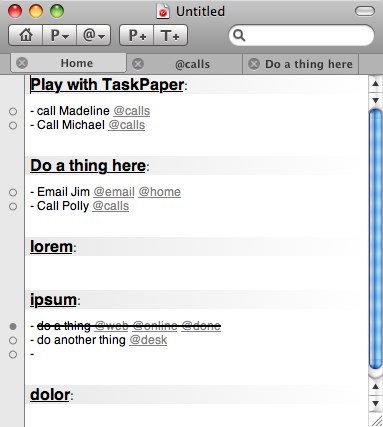
Hog Bay Software’s TaskPaper was recently released in a completed 1.0 version (previously), and if you’re the sort of person who casts about for a simple way to manage projects and tasks from a Mac, this just may be your app. But, even more significantly, if you’re not looking for a simple action management system — if you’re that particularly pathetic sort of character who’s convinced that features like tagging, syncing, collaboration, graph paper generation, and the introduction of an onboard artisanal breadmaker are all that stands between you and getting your stuff done — well, you may need TaskPaper more than anybody. Because, friends, TaskPaper is just about fiddle-proof, and, frankly, I know a lot of people who could benefit from that today. Here’s what a simple document looks like in TaskPaper:
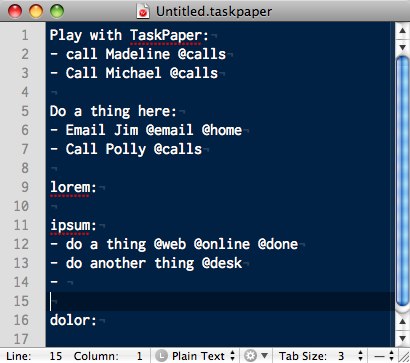
There’s your projects, there’s your tasks, there’s your contexts, and there’s your ability to see what you’ve ticked off. THAT, as John Hodgman might say, IS ALL. So, first off and best off, TaskPaper is just text. Although documents created with TaskPaper will have the “
I like the clarity and simplicity of the document’s formatting, and how it virtually negates the ability to fiddle. Actually, on first glance, the magic of TaskPaper may look familiar to people who have used syntaxes like Chairman Gruber’s peerless Markdown. I mean it really is just endlessly portable and mungeable text; it’s TaskPaper’s li’l engine that turns that formatting into the hooks that let you “do stuff” like view by context or project, and so on. This latest cut adds tabs for doing this neato functional stuff, and I have to say it’s really appealing. The approach is similar to OmniFocus — but even more obsessively concerned with keeping the system focused solely on completing tasks (rather than grooming and feeding them for months while they grow long hair and learn how to drive a stick). Yes: absolutely — TaskPaper will be way too simple for a lot of people’s needs (including mine). But, if you’re so overwhelmed with “flexibility” that you’re getting close to throwing in the towel on an electronic system and are considering going back to paper, (while I’d never be one to stand in your way) you might want to give TaskPaper a whirl. If you love text and could benefit from the portability of a simple electronic document, it’s definitely worth looking at. TaskPaper is free to try, and it’ll only set you back $18.95 if you decide to buy a copy. Download ‘er now. 13 Comments
POSTED IN:
Oooh, a gui on todo.txtSubmitted by Fatlimey on October 24, 2007 - 11:14am.
I’ve been loving the python scripts from http://code.google.com/p/todotxt/ for hacking on my todo.txt file, especially the philosophy of “choose your own project format”. »
Perfection for MeSubmitted by skylarp on October 24, 2007 - 11:15am.
TaskPaper is the GTD app I was waiting for (and I didn’t even know it!). I’ve been using the OmniFocus builds for months, and I’ve noticed that I spend an inordinate amount of time fiddling around with it. Furthermore, I have to use a PC at work, so I was rocking a separate text file as my work To Do list. Yesterday, I added a .taskpaper extension to the file, mucked a tiny bit with the formatting, and—BOOM!—it’s a TaskPaper file. This is definitely one of those cases where simplicity = bliss. I purchased last night, after only one day of trying it out. PS The screenshots in the post look suspiciously Leopard-y… :P »
PC @ work, any future ideas?Submitted by mjc on October 24, 2007 - 5:29pm.
Skylarp, I’d be interested in hearing more about how you use your Taskpaper file on your work PC. I recently started at a company which uses PCs and Lotus Notes. Naturally, I miss my Mac, especially when I see wicked useful apps like Taskpaper, which would be perfect for my needs. Are there any workarounds that could be developed for using a Taskpaper-like program on Windows? Web-apps are unfortunately not really allowed either. M »
tag for paper planner 'sync'Submitted by M_N on October 24, 2007 - 11:32am.
In the past week I tried the 0.9.x version of this app and I love it. But I still use my paper planner a lot, with its gtd project / next actions lists and its ‘notetaking feature’, which even allows me to create mindmaps (fiddle-proof). Switching between paper and computer is a bit counter-intuitive, but confusion can be kept under control: I only use taskpaper for projects and next actions that I have to do at my computer or my desk - I found that everything else, especially project lists, ‘errands’ and ‘waiting for’-tasks, is easier to review in paper. When a project or task is related to an item in taskpaper, I mark it in the paper planner with a rectangle. In taskplanner, items that relate to paper planning can be marked as well, with a tag like @calendar. Works great so far! »
Yes...Submitted by TommyW on October 24, 2007 - 11:45am.
I’m stuck in a no-mans land between it and Omnifocus. OF matches my complexity. But tasks have hid there too. In using TP a few things really do help. I also found that I ended up with very complex project structures in OF. Very. Complex. And TP makes me be simple. Which is kind of great, you gotta just do. But… then again, there’s a part of me that brackets my experience of it. I’m always aware that I’m stopping my analytical break-it-all-down side from fully flowering… TP just doesn’t do my projects justice. Stuck in the middle…. »
Re: TaskPaper 1.0 adds new features (and "fiddling" isn't one ofSubmitted by Henrik N on October 24, 2007 - 2:47pm.
Speaking of TextMate, I made a bundle that's very much inspired by TaskPaper. »
Nice bundle!Submitted by Merlin Mann on October 24, 2007 - 4:20pm.
Oh, sweet. I’m so linking to this from the home page tomorrow. Nice work, and thanks, Henrik. »
Great for iPhoneSubmitted by CSGiles on October 24, 2007 - 2:51pm.
This is a very nice little application. I love it’s simplicity. It works well to get a list onto my iPhone. I have an email account that I use only for loading info onto my iPhone. It’s easy to copy and paste the TaskPaper list into an email and send it to my iPhone account. I pick up the email on my iPhone as I walk out the door and I’ve got all my lists with me for review. TaskPaper works great for this because it is so simple and the list is in plain text. Inspired! »
Re: Great for iPhoneSubmitted by Merlin Mann on October 24, 2007 - 2:59pm.
Man, I really hope we see an end to the need for hacks like that soon, you know? After while, a Smartphone without action management starts not seeming so smart. »
Hi Merlin, Actually, I’mSubmitted by CSGiles on October 25, 2007 - 1:22pm.
Hi Merlin, Actually, I’m probably alone in my thinking on this but I don’t think Apple intends to have iPhone NOTES sync to the desktop. That way I see it the whole philosophy behind the iPhone is very email-centric. The way you get to read PDF, Word, Excel, docs, etc. is to email them to youself (most conviently by using a special email account). I see NOTES as an extension of that. Apple knows that a lot of people send themselves emails as reminders. The NOTES is just another way of doing that. If I’m right, you can send a Note from your iPhone to NOTES in Mail, and vice versa, but they will not sync. Apple wants to get away from mini-databases and list managers. The way you get apps on iPhone is to use Web Apps, and the way you get documents and lists on the phone is to use Email. There will be 3rd party apps soon, and we will see what all that is about. But if I read the oracles right, Apple’s iPhone is all about the web and email as well as voice and voice mail. It’s not really intended as a Smartphone. It’s a different category of gadget and a different way of thinking and doing things. ;-) »
About Merlin MannBio Merlin Mann is an independent writer, speaker, and broadcaster. He’s best known for being the guy who started the website you’re reading right now. He lives in San Francisco, does lots of public speaking, and helps make cool things like You Look Nice Today. Also? He looks like this, answers questions, and has something like a life. Merlin’s favorite thing he’s written recently is a short essay called, “Better.” |
|
| EXPLORE 43Folders | THE GOOD STUFF |